

Extension:SimpleTasks
 This extension is maintained by a member of the MediaWiki Stakeholders' Group.
 Release status: stable |
|
|---|---|
 |
|
| Description | Tasks are checklist items that can be checked on or off to indicate if the task is open or completed. |
| Author(s) | Hallo Welt! GmbH |
| Maintainer(s) | Hallo Welt! GmbH |
| Latest version | 4.5 |
| Compatibility policy | For every MediaWiki release that is a Long Term Support release there is a corresponding branch in the extension. |
| MediaWiki | 1.39 (LTS) |
| License | GNU General Public License 3.0 only |
| Download | |
| Translate the SimpleTasks extension if it is available at translatewiki.net | |
 Community Forum Community Forum
|
Tasks are checklist items that can be checked on or off to indicate if the task is open or completed.
Usage
SimpleTasks provides checkboxes with labels that can be marked completed in view mode. The changes are logged in the page history.
Simple tasks
Simple tasks show a checkbox with a task description.
To add a simple task:
- Click the Content Droplet icon in the editor toolbar.
- Select the Tasklist droplet. This inserts a checkbox.
- Add the task description next to the checkbox.
- Repeat steps 2 and 3 to add more tasks. Alternatively, copy the first task line and paste it onto new lines. Then change the individual task descriptions.
You can now check the items of your list. Everytime a checkbox is checked or unchecked, the version history of the page creates an entry.
Combined tasks
Tasks can have three elements: (1) A task checkbox with label, (2) an assignee, and (3) an optional date. When these elements are added to the page consecutively (the order of these elements is flexible), a single task item is created.
To add a combined task item:
- Add your task list item as described above.
- Add a mention (as described above) immediately after the task description to assign the task to a user.
- Add a Date Content Droplet immediately after the user mention (optional).
- Copy the entire task line and paste it on a new line to create the next task item.
My Tasks
Users can see all their open tasks on their task list.
Querying tasks
If you are familiar with Semantic MediaWiki, you can query the task items. They are added as semantic subobjects with the following properties:
- Property:Task/Desc
- Property:Task/Due date
- Property:Task/User
-
 Task Item
 -
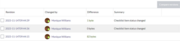 Checkbox changes in the page history
 -
 Finished task list


Installation
- Download and move the extracted
SimpleTasksfolder to yourextensions/directory.
Developers and code contributors should install the extension from Git instead, using:cd extensions/
git clone https://gerrit.wikimedia.org/r/mediawiki/extensions/SimpleTasks - Only when installing from Git, run Composer to install PHP dependencies, by issuing
composer install --no-devin the extension directory. (See task T173141 for potential complications.) - Add the following code at the bottom of your LocalSettings.php file:
wfLoadExtension( 'SimpleTasks' );
- Run the update script which will automatically create the necessary database tables that this extension needs.
 Done – Navigate to Special:Version on your wiki to verify that the extension is successfully installed.

Requirements
The following other installations are required to install SimpleTask:
- Extension:AtMentions (which requires Extension:OOJSPlus)
- Extension:DateTimeTools
- Extension:Checklists
External links
See also
 | This extension is included in the following wiki farms/hosts and/or packages: This is not an authoritative list. Some wiki farms/hosts and/or packages may contain this extension even if they are not listed here. Always check with your wiki farms/hosts or bundle to confirm. |