

Extension:EasyTimeline/it
 Stato della release: stabile |
|
|---|---|
| Implementazione | Etichetta |
| Descrizione | Aggiungi il tag <timeline> per creare delle timeline |
| Autore(i) | Erik Zachte |
| MediaWiki | >= 1.42 |
| Modifiche al Database | No |
| Licenza | GNU General Public License 2.0 only |
| Scaricare | CHANGELOG |
| Esempio | See below |
|
|
| Public wikis using | 7,989 (Ranked 20th) |
| Traduci l'estensione EasyTimeline | |
| Problemi | Compiti aperti · Riportare un bug |
| Altre lingue: |
L'estensione EasyTimeline produce un'immagine incorporata dal wikitext. L'immagine può essere un diagramma monodimensionale ( orizzontale o verticale) o bidimensionale.
See the help page on installing EasyTimeline on your wiki. See also this page on EasyTimeline or play with it at test.wikipedia.org.
See the help page on using the syntax provided by this extension.
There is a long-term effort to get the Chart extension to replace this extension.
Grafici di esempio
Several examples of what is possible. For more extensive examples, see
- WW II - Pacific Theatre - horizontal
- History of Computing - horizontal
- Tour-de-France Sieger - vertical
- Vocal and instrumental pitch ranges (a nice example of a diagram that is not a timeline at all) - horizontal
- Complete Timeline of Macintosh models - horizontal
- Simpler timelines:
- :en:Template:Extinction events graphical timeline - horizontal, uses w:Template:Horizontal timeline
- :en:Talk:Invention_of_radio/Archive_1#Timeline.2C_Players - horizontal with arrows
- :en:Gaius_Marius#Timeline - vertical
- Population developement - horizontal
 |
    | |
 | ||
Esempio di utilizzo
- See also: Extension:EasyTimeline/syntax
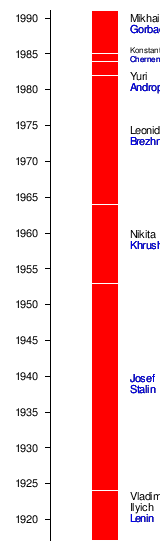
Just to show you that the script syntax is reasonably intuitive, here is the script for the image above: Soviet Leaders.
<timeline>
# All measures are in pixels

ImageSize  = width:160 height:550
PlotArea   = left:50 right:0 bottom:10 top:10
AlignBars  = justify

DateFormat = yyyy
Period     = from:1917 till:1991
TimeAxis   = orientation:vertical
ScaleMajor = unit:year increment:5 start:1920

# there is no automatic collision detection,
# so shift texts up or down manually to avoid overlap

Define $dx = 25 # shift text to right side of bar

PlotData=
  bar:Leaders color:red width:25 mark:(line,white) align:left fontsize:S

  from:start till:1924 shift:($dx,15)   text:Vladimir~Ilyich~[[Special:MyLanguage/Lenin|Lenin]]
  from:1924  till:1953 shift:($dx,5)    text:[[Special:MyLanguage/Stalin|Josef~Stalin]]
  from:1953  till:1964 shift:($dx,5)    text:Nikita~[[Special:MyLanguage/Khrushchev|Khrushchev]]
  from:1964  till:1982 shift:($dx,5)    text:Leonid~[[Special:MyLanguage/Brezhnev|Brezhnev]]
  from:1982  till:1984 shift:($dx,-12)  text:Yuri~[[Special:MyLanguage/Andropov|Andropov]]
  from:1984  till:1985 shift:($dx,4)    text:Konstantin~[[Special:MyLanguage/Chernenko|Chernenko]] fontsize:XS
  from:1985  till:end  shift:($dx,10)   text:Mikhail~[[Special:MyLanguage/Gorbachev|Gorbachev]]
</timeline>
Double and single brackets can be used like on Wikipedia, and language prefixes are possible, e.g., [[de:foo|more about foo]]. Single brackets for external links are also supported.
Unicode
EasyTimeline does not yet support Unicode.
Aug 2004: Minimal UTF-8 support has been added, meaning EasyTimeline now recognizes UTF-8 encoded characters. However, support for directionality and complex scripts is very lacking. The default font may not have glyphs for all characters. An alternate font can be specified via $wgTimelineFontFile
Da SVG a PNG
To show texts correctly for RTL languages (like Arabic, Persian, Hebrew,...) you can use <timeline method="svg2png">timeline code here</timeline> instead of <timeline>timeline code here</timeline>. it shows the timeline as png, but the links will be disabled.
Suggerimenti
For first-time users, EasyTimeline may not seem that easy at all. As with all script languages, it takes some getting used to. Also, the syntax description may be a bit bewildering due to its sheer size. Fortunately, many elements of the script language are optional.
The 'Easy' in EasyTimeline conveys the message that once a timeline exists, it is not so hard to understand, enhance, or correct. Also, translating it for use on another Wikipedia is pretty straightforward.
Suggerimenti:
- See some chart examples to find something you could pick and edit for your purposes
- Put each timeline on a separate Template page: this makes it easier to edit, faster to preview, and possible to include it in several pages
Utilizzo della data odierna
Per utilizzare la data odierna, assicurati che la tabella inizi con {{#tag:timeline| e termini con }}. Poi, la data attuale, si può inserire usando le magic words. Per esempio {{#time: d/m/Y }} or {{CURRENTDAY2}}/{{CURRENTMONTH2}}/{{CURRENTYEAR}} entrambi produrranno la data nel formato dd/mm/yyyy.
Then the current date can be inserted using magic words.
For example {{#time: d/m/Y }} or {{CURRENTDAY2}}/{{CURRENTMONTH2}}/{{CURRENTYEAR}} will both yield the date in format dd/mm/yyyy.
Vedi anche
- Presentation about EasyTimeline at Wikimania 2005 (abstract, slides, speaker notes)
- w:Template:Simple Horizontal timeline An easier timeline to use on Wikipedia.
Installazione
- == Requisiti ==
This extension requires the following software to be installed on the server:
- Installation
See the installation instructions.
 | Questa estensione viene utilizzata su uno o più progetti Wikimedia. Ciò probabilmente significa che l'estensione è stabile e funziona abbastanza bene da essere utilizzata da siti Web ad alto traffico. Cerca il nome di questa estensione nei file di configurazione CommonSettings.php e InitialiseSettings.php di Wikimedia per vedere dove è installato. Un elenco completo delle estensioni installate su un particolare wiki può essere visto sulla pagina Special:Version del wiki. |
 | This extension is included in the following wiki farms/hosts and/or packages: This is not an authoritative list. Some wiki farms/hosts and/or packages may contain this extension even if they are not listed here. Always check with your wiki farms/hosts or bundle to confirm. |
- Stable extensions/it
- Tag extensions/it
- GPL licensed extensions/it
- Extensions in Wikimedia version control/it
- ParserFirstCallInit extensions/it
- All extensions/it
- Graphical Timelines/it
- Extensions used on Wikimedia/it
- Extensions included in Fandom/it
- Extensions included in Miraheze/it
- Extensions included in ShoutWiki/it
- Extensions included in WikiForge/it