

Extension:ContainerFilter
 This extension is maintained by a member of the MediaWiki Stakeholders' Group.
 Release status: stable |
|
|---|---|
| Description | Allows to filter content elements within a page |
| Author(s) | Hallo Welt! GmbH |
| Latest version | 2.0.0-alpha |
| Compatibility policy | For every MediaWiki release that is a Long Term Support release there is a corresponding branch in the extension. |
| MediaWiki | 1.39+ |
| License | GNU General Public License 3.0 only |
| Download | |
| Quarterly downloads | 8 (Ranked 132nd) |
| Translate the ContainerFilter extension if it is available at translatewiki.net | |
You can now mark sections of a page for filtering and display a filter just for the content located within these sections of the page.
-
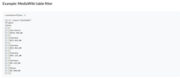 Example: MediaWiki table filter
 -
 Example: MediaWiki table filter output
 -
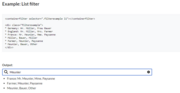 Example: List filter and output List filter


Installation
[edit]- Download and move the extracted
ContainerFilterfolder to yourextensions/directory.
Developers and code contributors should install the extension from Git instead, using:cd extensions/
git clone https://gerrit.wikimedia.org/r/mediawiki/extensions/ContainerFilter - Add the following code at the bottom of your LocalSettings.php file:
wfLoadExtension( 'ContainerFilter' );
 Done – Navigate to Special:Version on your wiki to verify that the extension is successfully installed.

Usage
[edit]For use with a table, you must use class=wikitable. Other class definitions are possible:
<containerfilter />
{| class="wikitable sortable"
 ! Item      !! Type
 |-
 | Apple     || Fruit
 |-
 | Potato    || Vegetable
 |-
 | Pear      || Fruit
 |-
 | Pumpkin   || Vegetable
 |-
 | Raspberry || Fruit
 |-
 | Spinach   || Vegetable
 |}
With Semantic MediaWiki
[edit]When using Semantic MediaWiki, you can use ContainerFilter with the following syntax:
{{#ask: [[Category:Cities]]
 |format=ul
 |class=filterexample
 |intro=<containerfilter selector=".filterexample li">
 |outro=</containerfilter>
}}
External links
[edit]- Extension reference: ContainerFilter
 | This extension is included in the following wiki farms/hosts and/or packages: This is not an authoritative list. Some wiki farms/hosts and/or packages may contain this extension even if they are not listed here. Always check with your wiki farms/hosts or bundle to confirm. |