

Extension:EnhancedUpload/zh
 This extension is maintained by a member of the MediaWiki利害關係者群組.
 发行状态: 稳定版 |
|
|---|---|
| 描述 | Provides a special page with the option to upload one or multiple files to the wiki |
| 作者 | Hallo Welt! GmbH |
| 最新版本 | 1.2-alpha |
| 兼容性政策 | 对于每个有长期支持的MediaWiki发行版本,扩展内都有对应的分支。 |
| MediaWiki | 1.35+ |
| Composer | mediawiki/enhanced-upload |
| 许可协议 | 僅限GNU通用公眾授權條款3.0 |
| 下載 | |
|
|
| 季度下載量 | 10 (Ranked 135th) |
| 前往translatewiki.net翻譯EnhancedUpload扩展 | |
This extension adds a new special page for multi-upload and improves drag-and-drop upload in VisualEditor.
It also introduces the <attachments /> tag that allows to easily maintain file lists on pages.
-
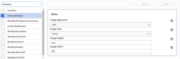 Configuration settings for the Enhanced upload

Installation
Install Extension:OOJSPlus and Extension:VisualEditor first, since they are required.
- 下载文件,并将其放置在您
extensions/文件夹中的EnhancedUpload目录内。
开发者和代码贡献人员应从Git安装扩展,输入:cd extensions/
git clone https://gerrit.wikimedia.org/r/mediawiki/extensions/EnhancedUpload - 将下列代码放置在您的LocalSettings.php的底部:
wfLoadExtension( 'EnhancedUpload' );
 完成 – 在您的wiki上导航至Special:Version,以验证已成功安装扩展。

Configuration
You can set some variables in the "LocalSettings.php" file:
$wgEnhancedUploadDragDropImagesAlignment = 'none';(default = 'right')- image alignment
$wgEnhancedUploadDragDropImagesWidth = '600px';$wgEnhancedUploadDragDropImagesHeigth = '600px';- image size
$wgEnhancedUploadDragDropImagesType = 'frameless';(default = 'thumb', other options 'frameless', 'frame', 'basic')- image type
外部链接
- Extension reference: EnhancedUpload
- Extension user help:
 | 此扩展在以下wiki农场/托管网站和/或软件包中提供: 這不是一份權威名單。 即使某些wiki农场/托管网站和/或软件包未在这里列出,它们也可能提供此扩展。 请检查你的wiki农场/托管网站或软件包以确认提供情况。 |
Categories:
- MediaWiki Stakeholders' Group/zh
- Stable extensions/zh
- Extensions with invalid or missing type/zh
- Extensions supporting Composer/zh
- GPL licensed extensions/zh
- Extensions in Wikimedia version control/zh
- BeforePageDisplay extensions/zh
- BlueSpiceDiscoveryTemplateDataProviderAfterInit extensions/zh
- MimeMagicImproveFromExtension extensions/zh
- ParserFirstCallInit extensions/zh
- SkinTemplateNavigation::Universal extensions/zh
- SpecialPage initList extensions/zh
- All extensions/zh
- Extensions included in BlueSpice/zh