

Help:Extension:Translate/ページ翻訳の例
翻訳者 (メインヘルプページ)
翻訳管理者
システム管理者と開発者
ようこそ! このチュートリアルを完了すると、翻訳ページの作成方法や、Translate 拡張機能を使用した翻訳ページ管理の方法を理解できるようになります。 私たちはこのチュートリアルを、基礎的な概念や作業を網羅しつつできるだけ短くすることを目指しています。 このチュートリアルを完了した後は、ページ翻訳機能についてのより詳細な説明文書をご覧になることもできます。
また、このチュートリアルの一部と並行して、Translate 拡張機能の使用法を学ぶのに役立つ動画チュートリアルの集合体も用意されています:
-
Translate 拡張機能を使用して、ページを翻訳対象に指定し、ページを翻訳する方法
-
翻訳対象ページのウィキテキストのソースを編集する方法
ステップ 1: 始める前に

このチュートリアルでは、翻訳用の拡張機能が既にインストールされ設定されていることを想定しています。 翻訳が必要なページを既に思い浮かべているかもしれませんし、以下の例のページで練習することもできます。以下の例では、このチュートリアルの手順を自分のウィキで試すことができます。
このページでは架空の自治体 Fréttinga について説明しています。
以下は、それに関連するwikicodeです。
Fréttinga is a small municipality in MungoLand, located on the BaMungo island.
It hosts a population of about 400 people. It has some agriculture and fishing.
Tourists like to visit it in the summertime.

== Services ==

It doesn't have many services. There is a shop, and a car ferry visits the island
from the mainland once a day.
- 1. wikiの
[[Fréttinga]]ページ(または下書きページ)に移動し、作成をクリックします。 - 2. 上記の内容を貼り付けて保存してください。
ステップ 2: 準備

なんらかの文章のあるページができました。
Note that source page can be written in any language. If its language is different from default wiki language, you — as a translation admin — have to set properly the page language using Special:PageLanguage sooner rather later, before Step 3 anyway.
変更箇所が多かったり、大胆に編集される可能性がある場合、翻訳システムを追加する前に、編集状況が通常程度に落ち着くまで待った方がいいかもしれません。 これは、すべての変更内容に追随するという大変な作業を翻訳者にさせるのを避けるためです。
このページは翻訳可能ですか?それでは、翻訳を依頼する方法を見てみましょう。
- 3.
[[Fréttinga]]を編集する - 4. 以下のように、コンテンツ全体を
<translate>...</translate>タグで囲みます。 - 5. ページを保存する
<translate>
Fréttinga is a small municipality in MungoLand, located on the BaMungo island.
It hosts a population of about 400 people. It has some agriculture and fishing.
Tourists like to visit it in the summertime.

== Services ==

It doesn't have many services. There is a shop, and a car ferry visits the island
from the mainland once a day.
</translate>
すべての要素に <translate> タグを追加する必要はありません。
<!--T:1--> のようなマーカーを自分で追加してはいけません。次のステップで拡張機能が行います。
ステップ 3: 翻訳を有効化
ページを保存すると、あなたが翻訳管理者である場合は、ページ上部に「このページを翻訳対象に指定」というリンクが表示されます。翻訳管理者ではない場合は「このページには翻訳対象に指定されていない[$1 変更]があります。」というリンクが表示されます。 あなたが翻訳管理者の場合は、「このページを翻訳対象に指定」リンクをクリックしてください。 ページは自動的に4つの翻訳単位に分割されます。 1つめの翻訳単位はページ名、2つめは第1段落、3つめは第2段落の見出し、4つめは第 2段落の本文です。 これらは翻訳対象ページの基礎的な項目であり、「各翻訳単位は独立している」・「まとめて翻訳できる」・「ページ本文の変更は翻訳単位ごとに追跡される」といった3つの特徴があります。 翻訳単位は再配置したり削除したりすることもできます。
ページ翻訳のページテンプレートの表示もあります。これについては、後のステップで説明します。
- 6. 「このページを翻訳対象に指定」リンクをクリックします
- 7. ページ本文が 3 つの翻訳単位に正しく分割されていることを確認します。
- 8. 「この版を翻訳対象に指定」ボタンをクリックします (注意: このためには 翻訳管理者 になる必要があります)
- 9. ページに戻る
これで、上部に「このページを翻訳」という新しいリンクが表示され、翻訳者がそのページを翻訳できるようになります。 このページを例にしている翻訳チュートリアルを見て、今すぐいくつかの翻訳を試してみてもいいでしょう。そして、次のステップのためにここに戻ってください。
ステップ 4: 変更する
変更が翻訳や翻訳単位に与える影響を理解する

変更の追跡は非常に重要な機能なので、いくつか変更を加えて、その動作を確認してみましょう。
編集のためにページを開くと、<!--T:1-->のようなマーカーで修正されていることがわかります。
これらは拡張機能によって追加され、どの翻訳単位がどの翻訳単位かを識別するのに役立ちます。これにより、それらの翻訳単位を並べ替えたり、編集したりすることができます。
ページを編集する際には、翻訳単位マーカーはそのままにしておき、所属する翻訳単位との位置関係を変更してはいけません。翻訳単位を移動する場合は、翻訳単位マーカーも移動してください。
ユニットを削除する場合は、マーカーも削除してください。 新しい段落を追加すると、ソフトウェアによって新しいマーカーが追加されます。 手動で行うと、ソフトウェアを混乱させる可能性がありますので、行わないでください。 あなたが削除したマーカーは、既存の翻訳でもボットによって自動的に削除されます。
既存の翻訳単位に軽微な変更 (数語の追加や段落へのリンクの追加) を行う場合、翻訳単位マーカーはそのままにしてください。 段落全体を変更した場合(削除して作り直した場合)、マーカーを削除します。 このように、翻訳者は、あいまいな翻訳を見直したり、新しい翻訳を作成したりと、さまざまな仕事をすることができます。
改造しよう!
ここでは、あなたが何をするのか:
<languages />
<translate>
<!--T:1-->
Fréttinga is a small municipality in MungoLand, located on the BaMungo island.
It hosts a population of about 400 people. It has some agriculture and fishing.
Tourists like to visit it in the summertime.
It has marvelous beaches with a lot of seagulls.

== Services == <!--T:2-->

<!--T:3-->
It doesn't have many services. There is a shop, and a car ferry visits the island
from the mainland once a day.

In 2009 January the roof of the church in the island fell down. It was rebuilt
collaboratively the following summer.
</translate>
- 10. 上記のように、いくつかの追加を行います。
- 11. 上部の「翻訳対象に指定」リンクをクリックします
- 12. 変化を観察する
- 13. 「翻訳対象に指定」ボタンをクリックします (注意: このためには 翻訳管理者 になる必要があります)
- 14. 元のページに戻る
前のステップで提案したように翻訳を行った場合、その翻訳がページ上部にリンクされているのが確認できます。 また、翻訳が100%最新でないこともおわかりいただけると思います。 翻訳ビューに移動すると、翻訳単位に更新が必要であることを示す印が表示されていますね。
古くなった翻訳はピンク色の背景で強調表示されます。翻訳が不完全であることが利用者に分かります。
翻訳の雛形の表示では、ページのどの部分が全言語版で共通する定数かを理解するのを支援します (「翻訳ページの雛型」は <translate>...</translate> タグの外側の部分のこと)。さらに、翻訳単位が移動/削除された場合も教えてくれます。
多数のページを更新する可能性があるため、翻訳済み版をすべて更新するのにわずかに時間がかかります。
以上が基礎知識ですが、このチュートリアルでは、よく直面する事項についてさらに説明します。
ステップ 5: 他のウィキ要素を追加

画像、カテゴリ、翻訳マーカー付きリストの追加
今、基本的な翻訳可能なページがありますが、非常に退屈です。 画像や他のものを追加して、より通常のwikiページのように見えるようにし、それらの要素が翻訳とどのように相互作用するかを見てみましょう。
さらに翻訳単位マーカーを含む段落を除去して箇条書きに置き換えるとどうなるか、見てみましょう。
- 15. 以下のように、画像、カテゴリ、リストをページに追加します。
- 16. ページを保存する
- 17. ページ上部の「翻訳対象に指定」リンクをクリックします
- 18. 変更内容が意図したとおりに表示されることを確認する
- 19. 「この版を翻訳対象に指定」ボタンをクリックします
- 20. 翻訳可能なページに戻る
<languages />
[[File:Torsö.jpg|thumb|<translate>A typical view of Fréttinga</translate>]]
<translate>
<!--T:1-->
Fréttinga is a small municipality in MungoLand, located on the BaMungo island.
It hosts a population of about 400 people. It has some agriculture and fishing and
tourists like to visit it in the summertime.
It has marvelous beaches with a lot of [[Special:MyLanguage/Seagull|seagulls]].

== Services == <!--T:2-->

<!--T:3-->
It doesn't have many services. There is a shop, and a car ferry visits the island
from the mainland once a day.

Main events:
* The roof of the church fell down in 2009
* New church was built in 1877

[[Category:Municipalities]]
</translate>
文書の翻訳
画像のタイトルのみを翻訳できるようにする。
[[File:Torsö.jpg|thumb|<translate>A typical view of Fréttinga</translate>]]
また、翻訳されたページ(ローカライズ版など)の画像ファイルやタイトルを変更できるようにすることも可能です。
<translate>[[File:Torsö.jpg|thumb|A typical view of Fréttinga]]</translate>
画像のマークアップの大部分を翻訳単位の外にしたことで、その部分が翻訳ページの雛形に入ることが分かるでしょう。 (注意: 翻訳ページの雛形は、異なる翻訳ページの間では変更されません) 通常はこれで問題ありませんが、翻訳者が画像を変更したい場合、特に画像が文字情報 (テキスト) を含んでいる場合があります。 その場合は、翻訳単位にマークアップ全体を含めるのが最も簡単な解決方法です (上記のカテゴリの記述と同様に)。
翻訳単位の翻訳がマークアップと関係がある場合は、それについて翻訳者向けに少し記述することをお勧めします。 これは以下の手順で行えます。

- 21. 上部の「このページを翻訳」リンクをクリックします
- 22. 「qqq - メッセージについての説明文」言語を選択します
- 23. 「A typical view of Fréttinga」(Fréttingaの典型的な景色) というメッセージを含むメッセージ名をクリックしてください。
- 24. 「画像の解説」と記入して「保存」をクリックします
これで、翻訳される画像のページ名の横に、「画像の説明」という説明文が表示されるようになりました。
リンクについて
[[Special:MyLanguage/Seagull]]
同様に、リンクについてもさまざまな方法があります。
利用者のインターフェイス言語に応じて翻訳版に自動的にリダイレクト (翻訳が存在する場合) される [[Special:MyLanguage/Seagull]] を使用してきました。
現在閲覧しているページの言語ではなく、使用しているインターフェイスの言語のページに常にリダイレクトされるため、これは究極の解決策ではありません。
さらに、Special:MyLanguage は Special:WhatLinksHere (リンク元) と干渉し、リンク元が正しく表示されなくなります。
Special:MyLanguage の利点は、表示しようとした翻訳ページが存在しない場合でも、何らかの言語のページが常に表示される点です。
カテゴリについて
この例では、カテゴリ指定全体が翻訳単位になっています。 これにより、翻訳者が [[Category:Municipalities/de]] のように、またはカテゴリに使用したい命名規約に従って、自由に変更できるようになります。 カテゴリ指定が外側 (つまり翻訳の雛形) にある場合は、Foo、Foo/de、Foo/ru、Foo/ta などのページすべてが同じカテゴリに入ります。 これで問題ない場合もありますが、これでは通常、利用者が混乱します。 ローカルでの命名規則について翻訳者に周知しておくようにしてください。
見出しについて
節見出しと本文を別要素として扱うには、見出しとその後に続く段落との間に、(空の行がない場合のみ) 空の行を 1 行追加してください。
以下の例だと1つの翻訳単位しかつくられません。
== Services ==
It doesn't have many services. There is a shop, and a car ferry visits the island from the mainland once a day.
次の例では 2 つの翻訳単位が作成され、その一方が見出しとなります。
== Services ==

It doesn't have many services. There is a shop, and a car ferry visits the island from the mainland once a day.
空白行を追加することで、翻訳者はいつ休憩できるかが分かるようになります。 さらに、ウィキテキストの問題を防止します。
最後に
ページ全体とその翻訳を操作する
また、翻訳可能なページとそのすべての翻訳を新しい名前に移動することも可能です。 多くのページを移動させる必要があるため、この操作は即座にはできません。 すべての翻訳を含むページ全体、または1つの翻訳バージョンのみを削除することができます。 これらの機能は、他のすべてのページと同じ場所からアクセスすることができます。
特別ページでウィキの全ページの翻訳を管理する
Special:PageTranslationは、システム内の全ページを一覧表示します。 翻訳可能なすべてのページの概観を与えるほかに、翻訳からページを阻止することも可能である。 これは、ほとんどのリストからページを隠します。これ以上の翻訳を防ぐことはできません。
-
 ページ翻訳の特別ページ
 -
 ページの移動
 -
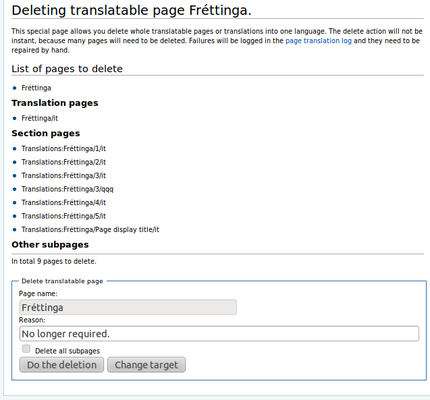 ページの削除


これで理解できましたね
翻訳対象ページを作成できるようになり、翻訳対象ページで実行可能なよく使用される操作をすべて体験しました。
さらに理解を深める
その他の情報を得たい場合や、機能をさらに深く理解したい場合は、続けてページ翻訳機能についての詳細な説明文書をお読みください。 そちらのページでは、リンク、カテゴリ、テンプレートを扱うさまざまな方法や、翻訳単位の大きさについての賛否両論、のような議論も記載しています。