Jump to content

Extension:SecurePoll

From mediawiki.org
This page is a translated version of the page Extension:SecurePoll and the translation is 63% complete.
MediaWiki扩展手册
SecurePoll
发行状态: 稳定版
实现 特殊页面
描述 允许进行选举、投票和调查
作者 Tim Starling留言
最新版本 3.0.0 (持续更新)
兼容性政策 快照跟随MediaWiki发布。 master分支不向后兼容。
MediaWiki 1.25+
数据库更改
  • $wgSecurePollShowErrorDetail
  • $wgSecurePollEditOtherWikis
  • $wgSecurePollUseLogging
  • $wgSecurePollKeepPrivateInfoDays
  • $wgSecurePollCreateRemoteScriptPath
  • $wgSecurePollUseNamespace
  • $wgSecurePollUseMediaWikiNamespace
  • $wgSecurePollMostActiveWikisThreshold
  • $wgSecurePollCreateWikiGroups
  • $wgSecurePollTempDir
  • $wgSecurePollCreateWikiGroupDir
  • $wgSecurePollExcludedWikis
  • securepoll-create-poll
  • securepoll-edit-poll
  • securepoll-view-voter-pii
许可协议 GNU通用公眾授權條款2.0或更新版本
下載
前往translatewiki.net翻譯SecurePoll扩展
問題 开启的任务 · 报告错误

SecurePoll扩展是一个特殊页面扩展,用于选举、投票和调查。 它被用于维基媒体基金会董事会的选举和仲裁委员会的选举,并被用于维基媒体许可证的过渡投票等。

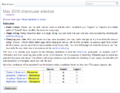
截图

安裝

  • 下载文件,并解压SecurePoll文件夹到extensions/目录中。
    开发者和代码贡献人员应改从Git安装此扩展,输入:
    cd extensions/
    git clone https://gerrit.wikimedia.org/r/mediawiki/extensions/SecurePoll
    
  • 請新增下列代码到您的LocalSettings.php 文件的底部:
    wfLoadExtension( 'SecurePoll' );
    
  • 請运行更新脚本,它将自动创建此扩展所必须的数据库表。
  • Yes 完成 – 請导航至您的wiki上的Special:Version,以验证此扩展已成功安装。

In addition, you will need to add some user groups and user rights to your LocalSettings.php file. Here is one way to do it, which gives a new group called electionadmin the power to do everything in SecurePoll (create polls, edit polls, see voter IP addresses):

$wgGroupPermissions['electionadmin']['securepoll-create-poll'] = true;
$wgGroupPermissions['electionadmin']['securepoll-edit-poll'] = true;
$wgGroupPermissions['electionadmin']['securepoll-view-voter-pii'] = true;

Once this group is created, a bureaucrat can add someone to the group using Special:UserRights. Then that person can visit Special:SecurePoll to view polls, create polls, edit polls, tally polls, etc.

Each poll's data is compartmentalized. You can have 100 electionadmins, but if you only add one electionadmin to a particular poll, only that one electionadmin will be able to edit that particular poll or see user IPs. If an electionadmin is removed from a poll, they will lose access to it.

securepoll-view-voter-pii is used for "scrutineering" a poll, which involves looking at a list of voter IPs, user agents, and X-Forwarded-For headers to look for cheating (secret duplicate votes by sockpuppets). Because this involves looking at voter IP addresses and other sensitive, personal, de-anonymizing data, it is a sensitive user right, so only trusted users should be assigned to the electionadmin group.

It is possible to split securepoll-view-voter-pii into a separate group. You can use a config such as the one below to create a group called scrutineer that contains the securepoll-view-voter-pii right, separating it from the electionadmin group:

$wgGroupPermissions['electionadmin']['securepoll-create-poll'] = true;
$wgGroupPermissions['electionadmin']['securepoll-edit-poll'] = true;

$wgGroupPermissions['scrutineer']['securepoll-create-poll'] = true;
$wgGroupPermissions['scrutineer']['securepoll-edit-poll'] = true;
$wgGroupPermissions['scrutineer']['securepoll-view-voter-pii'] = true;

A user also needs to be added to the poll (and hence have the securepoll-edit-poll right) in order to view PII - securepoll-view-voter-pii by itself has no effect.

用法

创建新投票

有两种方法来创建一个新的投票:手动创建一个XML文件并导入,或者使用Special:SecurePoll的投票创建界面。

手动

要手动创建一个投票,需要:

  1. 编写一个XML文件
  2. 使用import.php命令行界面命令导入它

在test文件夹中,你可以找到四个示例文件。

  • 3way-test.xml
  • approval-test.xml
  • radio-range.xml
  • schulze-test.xml info

要导入一个投票,从cli文件夹中运行以下内容。

extensions/SecurePoll/maintenance$ php importElectionConfiguration.php ../tests/phpunit/data/3way-test.xml

要使用docker导入一个投票,从cli文件夹中运行以下内容:

docker-compose exec mediawiki php extensions/SecurePoll/maintenance/importElectionConfiguration.php extensions/SecurePoll/tests/phpunit/data/3way-test.xml

通过Web界面

拥有securepoll-create-poll权限的用户可以点Special:SecurePoll下面的链接来创建新的投票。

要创建一个新的投票,请填写创建表格中的必填项。 请特别关注一下字段:

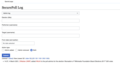
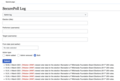
  • 只有electionadmin组的成员允许增加投票管理员。如果$wgSecurePollUseLogging设置为true,那么不管增加还是移除投票管理员都会留下日志。日志可以在Special:SecurePollLog查看。
  • 要创建一个加密的投票,请选择加密方法。 如果你选择GnuPG,会生成一个公钥和一个私钥。 在创建表格中输入加密密钥,并将私人密钥保存在线下的某个地方(一旦选举结束,你将需要它来进行统计)。 [$1 一个详细示例可以在这里找到]。

现在访问Special:SecurePoll,你会看到你的投票。 At the top of the poll is some introductory text about the poll. By default it will show [text], and this can be edited via the translation interface (see below).

编辑现有投票

要编辑一个投票,你必须是该特定投票的管理员。 在Special:SecurePoll,点击编辑你想要的投票。

在选举开始之前,关于选举的任何内容都可以被编辑。 选举开始后,有些字段就不能再编辑了。

编辑可以参与投票的人

要编辑谁可以投票,你必须是该投票的管理员。 在Special:SecurePoll,点击该投票的投票者资格链接。

翻译一个投票

要翻译一个投票,你必须是该特定投票的管理员。 在Special:SecurePoll,在你想翻译的投票处点击翻译链接来翻译。

查看投票者名单

任何人都可以看到投票者的名单,除非在创建投票时禁用了透明功能。

某一投票的管理员可以看到投票者的名单,以及可能有助于识别重复投票者的私人信息(例如IP地址、用户代理信息、共享cookies)。 如果$wgSecurePollUseLogging设置为true,任何管理员查看隐私数据都会留下日志。 这些日志可以在Special:SecurePollLog查看。

管理员可以删除任何他们认为是重复的投票。

计票

要统计一个投票,你必须是该特定投票的管理员。 Special:SecurePoll,点击计票链接为你想要计票的投票计票。

如果投票之前已经统计过,结果将显示在页面上。 如果没有,或者你想重新统计,有一个表格可以开始新的统计。

  • 如果投票是未加密的,点击计票按钮。
  • 如果投票是加密的,你需要输入更多信息。比如,如果你使用GnuPG,输入私钥并点击计票按钮。如果加密投票有很多人投票,可能会花很长时间计票。你可能需要过段时间再回来查看结果。

访问Special:SecurePoll,你就能看到你的投票。

单一可转移票制计票

更多关于单一可转移票制的信息,可以在維基百科找到。

贪心算法实现(來源)

Quota is + .000000001. Quota is the minimum value of votes to secure a seat.

1. Compute the quota.
2. Assign votes to candidates by first preferences.
3. Declare as winners all candidates who received at least the quota.
4. Transfer the excess votes from winners to hopefuls.
5. Repeat steps 3 and 4 until no new candidates are elected. (Under some systems, votes could initially be transferred in this step to prior winners or losers. This might affect the outcome.)
If all seats have winners, the process is complete. Otherwise:
6. Eliminate one or more candidates, typically either the lowest candidate or all candidates whose combined votes are less than the vote of the lowest remaining candidate.
7. Transfer the votes of the losers to remaining hopeful candidates.
8. Repeat 3–7 until all seats are full.

The quota we will use (step 1) is the Droop quota (source):

floor( no. votes / (no. seats + 1) ) + 1

The method for transferring votes from elected or eliminated candidates will be the Meek method:

Tallying (JobRunner)

  • Tallies can be processed via a scheduled job Manual:作业队列 . Make sure to create a scheduled job for this task or execute the task manually.
  • Tallies can also be processed by executing the tallying script manually:

To execute a tally, run the following from the MediaWiki root folder:

extensions/SecurePoll/maintenance/TallyElection.php

To execute a tally using MediaWiki-Docker, run the following from the MediaWiki root folder:

docker-compose exec mediawiki php extensions/SecurePoll/maintenance/TallyElection.php

Generating (STV) Test Elections

  • Test (STV) elections can be generated from the MediaWiki root folder:
  • To generate a test election, run the following from the MediaWiki root folder:
extensions/SecurePoll/maintenance/GenerateTestElection.php
  • Test (STV) elections provide scaffolding from which to tally on

Redirect polls

A redirect poll is a poll that shows up in the list of polls at Special:SecurePoll, but clicking on "vote" and other links will redirect the voter to a different wiki. This is useful if you do all of your votes on a central votewiki (in Wikimedia's case, https://vote.wikimedia.org).

Special:SecurePoll/create will show an additional drop-down list called "For wiki:"—allowing you to select "This wiki", "All wikis", or a different wiki in your wiki farm—if all of the following conditions are met:

  • You are using a wiki farm (multiple wikis using the same file system but different databases).
  • You haven't excluded all other wikis using $wgSecurePollExcludedWikis.
  • You have $wgCanonicalServer configured to have a period (use different subdomains) on each wiki.
  • You have $wgSecurePollEditOtherWikis = true; for your current wiki.

If you have a wiki in your wiki farm that doesn't have SecurePoll installed, be sure to add it to $wgSecurePollExcludedWikis to keep it out of the "For wiki:" list.

"For wiki" dropdown item selected What it does locally What it does on other wikis
此wiki Creates a local election Nothing
所有的wiki Creates a local election Creates "redirect polls" at every other wiki in the wiki farm
Picking a specific other wiki such as es.wikipedia.org Creates a local election Creates a "redirect poll" at the chosen wiki

Testing note: $wgCanonicalServer must contain domains with subdomains. So for example, http://localhost will not get the dropdown list to show up, but http://en.localhost will.

$wgConf->settings = [
   'wgCanonicalServer' => [
      'my_database' => 'http://en.localhost:8080',
      'secondwiki' => 'http://es.localhost:8080'
   ],

In the database, fields related to redirect polls include the following securepoll_properties.pr_keys: jump-id, jump-url, main-wiki, and mobile-jump-url.

For developers

SQL tables

Note that configuring a poll to use encryption encrypts the securepoll_votes.vote_record field.

Most Wikimedia installations of SecurePoll only have a subset of these tables because they are configured to only host redirect polls that redirect to votewiki. They do not have any local polls. phab:T395928
Table Field prefix Description Contains sensitive data? Table needed for redirect polls?[1][2]
securepoll_cookie_match cm_ Used on the vote details page to display the securepoll-cookie-dup-list message ("Cookie duplicate users"). Yes No
securepoll_elections el_ List of elections, and some basic config data such as the name, creator, start date, end date, language, ballot type (e.g. approval), and tally type (e.g. plurality). Additional config data is pivoted and stored in securepoll_properties instead. No Yes
securepoll_entity en_ Maps "one to many" with the securepoll_msg table. The "many" is because a securepoll_msg can be in multiple languages. Possible options for securepoll_entity.en_type are election, question, and option. No Yes
securepoll_lists li_ Stores usernames manually added via the Voter Eligibility page. Users are added in the format userName@databaseName. There are 3 types of lists:
  • Eligibility list - The li_name value is [electionId]/list/need-list. These are folks who are allowed to vote if they meet the on-the-fly eligibility requirements such as X number of edits.
  • Overrride list - The li_name value is [electionId]/list/include-list. These are folks who are allowed to vote no matter what.
  • Exclude list - The li_name value is [electionId]/list/exclude-list. These are folks who are not allowed to vote no matter what.
No Yes
securepoll_log spl_ If $wgSecurePollUseLogging is set to true, stores the log entries here. Yes. Special:SecurePollLog is private. No
securepoll_msgs msg_ List of strings. For example, the poll name, the poll questions, and the poll answers. This is mapped to from other tables such as securepoll_options and securepoll_questions, and supports having the same entity in multiple languages (securepoll_msgs.msg_lang). No Yes
securepoll_options op_ List of poll options for each question. Doesn't store the option text here, but rather maps it to the table securepoll_msgs. No No
securepoll_properties pr_ Config data for each election. For example, who the election admins are, whether it's a redirect poll, whether to shuffle the options, whether to use encryption, list of tallies and their values (tally-result), etc.

Is also the config data for on-the-fly voter eligibility calculation. For example, voter minimum edit count and voter not-sitewide-blocked is stored here.

Partial. Rows with pr_key as gpg-encrypt-key, gpg-sign-key, openssl-encrypt-key, openssl-sign-key, tally-result, tally-result-time are private data. Yes
securepoll_questions qu_ List of poll questions. Doesn't store the question text here, but rather maps it to the table securepoll_msgs. No No
securepoll_strike st_ Which votes have been struck (crossed out, removed from the tally) by election admins. Includes a reason that they can type in. Yes. Only election admins can see the strike log from the UI. No
securepoll_voters voter_ One row per voter per election. Voters are distinct and will not be duplicated in the same election. Contains data on the voter such as their user groups and whether they're blocked or not. Probably used to determine voter eligibility. voter_properties contains data such as wiki, blocked, sitewide blocked, central block count, central sitewide block count, edit count, bot, language, user groups, eligibility lists, and registration date. Partial. This is private for elections with transparency features disabled. No
securepoll_votes vote_ One row per vote per election. Contains data on the voter such as IP address and user agent, and contains the actual vote in the vote_record column. The "most active wiki" that the voter chose, if enabled for this poll, is stored in vote_voter_domain. vote_current=0 means that this is a duplicate vote and has been discarded; this is re-calculated for all of the user's previous votes each time they submit a new vote. Yes. Contains voter PII such as IP addresses and user agents. Contains the vote itself and its timestamp (the vote date is public unless the voter list is turned off, the vote time is private). No

Enabling local elections on a Wikimedia wiki

SecurePoll is installed on every wiki except loginwiki and wikitech. But additional configuration is needed to get it to host local elections (and not just redirect polls / global elections).

  • Phab ticket - Create a Phabricator ticket to start the process and centralize discussion. Tag it "Wikimedia-site-requests" and "MediaWiki-extensions-SecurePoll". Make the ticket a parent of T301180 Allow local wikis to set up elections.
  • Consensus - Get consensus to have local elections through a noticeboard discussion on your local wiki, and then link it in the phab ticket.
  • Tables - Have someone with the right production shell access (ops, deployment, restricted, analytics-privatedata-users) check that your wiki has the below tables in s1-s8 (not x1). If your wiki is missing any of these tables, ask someone with the right production shell access (ops, deployment) to create them. After T403874, these will be created by running the maintenance script WikimediaMaintenance -> createExtensionTables.php. Until that ticket is resolved, will need to do something else. Maybe copy paste some of SecurePoll -> sql/mysql/tables-generated.sql into the MariaDB monitor?
    • securepoll_cookie_match
    • securepoll_log - only needed if you're using the private logging feature ($wgSecurePollUseLogging)
    • securepoll_options
    • securepoll_questions
    • securepoll_strike
    • securepoll_voters
    • securepoll_votes
  • Patch - Write and deploy a gerrit patch similar to this one
    • If you want the public logging feature (logging when election officials change election settings, logs to public pages), set $wgSecurePollUseMediaWikiNamespace. $wgSecurePollUseNamespace is also an option, but is discouraged, because it creates an entire namespace for a small number of pages.
    • If you want the private logging feature (logging when election officials view IPs, logs to a private page), set $wgSecurePollUseLogging
  • NameTableAccessException - If you are getting the error "MediaWiki\Storage\NameTableAccessException: No insert possible but primary DB didn't give us a record for 'SecurePoll' in 'content_models", this is from T399633. The one time fix is to have a deployer run INSERT INTO content_models (model_name) VALUES ('SecurePoll')

Only the following wikis are able to run local elections, until they follow the checklist above. The ability of a wiki to create local elections depends on it having a user group with the user right securepoll-create-poll. Feel free to add your wiki here once it's gone through the above process.

  • enwiki
  • fawiki
  • officewiki
  • testwiki
  • votewiki
  • zhwiki

帮助文档

安全投票

安全投票的所有相关文档可在wikitech:SecurePoll查看。

安全投票的改进

SecurePoll的改进摘要可在Special:MyLanguage/Anti-Harassment Tools/SecurePoll Improvements中找到。

理解STV结果

See also