

Extension:LinkedWiki
 Release status: stable |
|
|---|---|
 |
|
| Implementation | Parser extension, Special page, Data extraction, API, Media |
| Description | The LinkedWiki extension allows you to read and save your data and reuse the Linked Open Data in pages or modules of your wiki. |
| Author(s) | Karima Rafes (Karima Rafestalk) |
| Latest version | 3.7.1 |
| MediaWiki | 1.35, 1.36, 1.37, 1.39, 1.40, 1.41 |
| PHP | 7.4+ |
| Composer | mediawiki/linkedwiki |
| License | Creative Commons Attribution Share Alike 4.0 |
| Download | README |
| Example | https://data.escr.fr/wiki/Category:Page_RDF |
|
|
|
|
| Quarterly downloads | 6 (Ranked 134th) |
| Translate the LinkedWiki extension if it is available at translatewiki.net | |
| Issues | Open tasks · Report a bug |
The LinkedWiki extension lets you reuse Linked Data in your wiki. You can get data from Wikidata or another source directly with a SPARQL query. This extension also provides Lua functions for building your modules so that you can write your data in your RDF database.
Quick start[edit]
After installing this extension:
- Open the special page: SPARQL editor
- Select a SPARQL service (in your settings) or write the endpoint of your SPARQL service
- Insert a SPARQL query (examples of SPARQL queries)
- Select a visualization: HTML table or a Sgvizler2 visualization
- For a Sgvizler2 visualization, you can click on the button "See the doc" to find its available options.
- Check the result
- To finish, open the tab "Howto use this query in this wiki?" and copy the generated wiki code in a page of your wiki
-
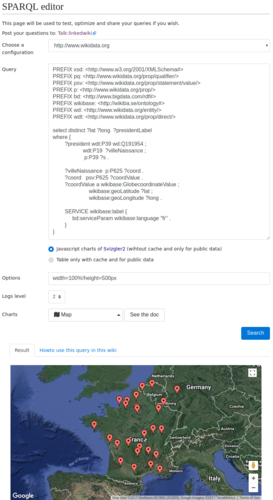 The special page "SPARQL editor"
 -
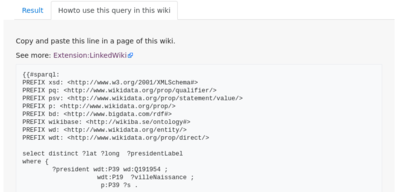 The special page generates the wiki code to be copied to a wiki page to display this visualization


See details : #sparql reuses your data in your wiki
Examples of visualizations[edit]
Maps[edit]


Only 3 parameters are necessary to print a map in your wiki:
- a SPARQL query
- a SPARQL service (by default Wikidata)
- a visualization (charts or table, pivot, etc.)
{{#sparql:
PREFIX xsd: <http://www.w3.org/2001/XMLSchema#>
PREFIX pq: <http://www.wikidata.org/prop/qualifier/>
PREFIX psv: <http://www.wikidata.org/prop/statement/value/>
PREFIX p: <http://www.wikidata.org/prop/>
PREFIX bd: <http://www.bigdata.com/rdf#>
PREFIX wikibase: <http://wikiba.se/ontology#>
PREFIX wd: <http://www.wikidata.org/entity/>
PREFIX wdt: <http://www.wikidata.org/prop/direct/>

select distinct ?lat ?long  ?presidentLabel
where {
        ?president wdt:P39 wd:Q191954 ;
                    wdt:P19  ?villeNaissance ;
                     p:P39 ?s .

        ?villeNaissance  p:P625 ?coord .
        ?coord   psv:P625 ?coordValue .
        ?coordValue a wikibase:GlobecoordinateValue ;
                        wikibase:geoLatitude ?lat ;
                        wikibase:geoLongitude ?long .

        SERVICE wikibase:label {
             bd:serviceParam wikibase:language "fr" .
        }
}
|config=http://www.wikidata.org
|chart=leaflet.visualization.Map
}}
For the leaflet.visualization.Map visualization with OpenStreetMap, you can add several options.
{{#sparql:
...
|config=http://www.wikidata.org
|chart=leaflet.visualization.Map
|options=width=100%!height=500px
}}
You can also use the google.visualization.Map visualization and see the log to debug your query or the visualization.
{{#sparql:
...
|config=http://www.wikidata.org
|chart=google.visualization.Map
|options=width=100%!height=500px
|log=2
}}
You can replace the parameter config by the parameter endpoint with a SPARQL endpoint but if that does not work, you will have to create a specific configuration for this SPARQL service.
{{#sparql:
...
| endpoint = http://example.org/sparql
...
}}
HTML table[edit]

By default, #sparql builds a HTML table that can be customized with wiki templates.
This visualization supports the service SPARQL with credentials that have to describe in the LocalSettings.php.
Example:
{{#sparql:
select * where { ?x ?y ?z . } LIMIT 5
| config = https://myPrivateSPARQLService.example.org/sparql
| headers =  ,name2,name3
| classHeaders= class="unsortable",,
}}
Datatable[edit]
Another available table "DataTable", this JavaScript visualization can be customized with HTML tags.
{{#sparql:
select * where
 { ?x ?y ?z . }
LIMIT 15
|config=http://www.wikidata.org
|chart=bordercloud.visualization.DataTable
|options=width=100%!height=500px
}}
Usage[edit]

Build SPARQL queries[edit]
The LinkedWiki extension gives two SPARQL editors. Flint Editor works with SPARQL endpoint 1.1 or 1.0 but sometimes, it doesn't work for example with Wikidata.
We develop a new SPARQL editor where you can select in one click an endpoint already defined in your configuration and read (and write, if you want) via SPARQL directly in this editor.
See details: Special pages to test your queries and to build your visualizations for your wiki
Visualize SPARQL results[edit]
The extension gives a parser #SPARQL to reuse your data and the Linked Open Data in your wiki.
You can use a new SPARQL endpoint or reuse a SPARQL service already defined in the configuration of your wiki.
See details :
Write data in the pages[edit]
The tag rdf lets to write directly in RDF/Turtle (1.0 or 1.1) on any page of wiki.
All pages with this tag are inserted in the category "RDF page".
If the option "check RDF Page" is enabled, the wiki checks the RDF before saving the page (see the installation). If there is an error, the wiki shows the line where there is a problem in the RDF code.
Example of page with the tag rdf to describe a RDF documentation:

<rdf>
prefix daapp: <http://daap.dsi.universite-paris-saclay.fr/wiki/Data:Project#>

prefix owl: <http://www.w3.org/2002/07/owl#>
prefix rdf: <http://www.w3.org/1999/02/22-rdf-syntax-ns#>
prefix rdfs: <http://www.w3.org/2000/01/rdf-schema#>
prefix sh: <http://www.w3.org/ns/shacl#>
prefix xsd: <http://www.w3.org/2001/XMLSchema#>
</rdf>

=== GeneralMethod ===

Descriptions...

==== Definition  ====
<rdf>
daapp:GeneralMethod
  rdf:type owl:Class ;
  rdfs:label "General method"@en ;
  rdfs:label "Méthode générale"@fr ;
  rdfs:subClassOf owl:Thing .

</rdf>

==== Constraints  ====
<rdf constraint='shacl'>
daapp:GeneralMethod
  rdf:type sh:Shape ;
  sh:targetClass daapp:GeneralMethod ;
  sh:property [
      rdfs:label "Label" ;
      sh:minCount 3 ;
      sh:predicate rdfs:label ;
    ] ;
  sh:property [
      rdfs:label "hasCampaign"^^xsd:string ;
      sh:minCount 1 ;
      sh:nodeKind sh:IRI ;
      sh:predicate daapp:hasCampaign ;
      sh:class daapp:Campaign ;
    ]
.
</rdf>
You can see the raw RDF of the page with these parameters : ?action=raw&export=rdf
[edit]
IRIs (or URIs) of pages with the tag rdf are Cool IRIs. So via a HTTP request, a machine see only the RDF content and a human can see the RDF content and its description in natural language in the same page.
You can see the final RDF data in the page when you click on the tab "Turtle".
For example with the page "http://example.org/wiki/Data:GeneralMethod", you can read these data with a Curl command (or via a load query in a database via SPARQL):
curl -iL -H "Accept: text/turtle" http://example.org/wiki/Data:GeneralMethod
Result:
HTTP/1.1 302 Found
Date: Fri, 22 Oct 2021 15:17:39 GMT
Server: Apache/2.4.37 (rocky)
X-Powered-By: PHP/7.4.24
X-Content-Type-Options: nosniff
Content-language: en
X-Request-Id: YXLWE2wOzCbKWMu1-8s2HgAAAMI
Location: http://example.org/wiki/Data:GeneralMethod?action=raw&export=rdf
Content-Length: 0
Content-Type: text/html; charset=UTF-8

HTTP/1.1 200 OK
Date: Fri, 22 Oct 2021 15:17:41 GMT
Server: Apache/2.4.37 (rocky)
X-Powered-By: PHP/7.4.24
X-Content-Type-Options: nosniff
Vary: Accept-Encoding,Accept-Language,Cookie
Expires: 0
Pragma: no-cache
Cache-Control: no-store
X-Request-Id: YXLWFWwOzCbKWMu1-8s2HwAAANY
Last-Modified: Fri, 22 Oct 2021 11:00:13 GMT
Transfer-Encoding: chunked
Content-Type: text/turtle;charset=UTF-8

BASE <http://example.org/wiki/Data:GeneralMethod>

daapp:GeneralMethod
  rdf:type owl:Class ;
  ...
If your wiki is private, it is possible to open your private wiki only for your RDF database (see the installation).
In the version >3.6.0, the wiki save the RDF data automatically in your database by default (see the installation) and if your database has a public SPARQL endpoint, your RDF data in the wiki are immediately in the Linked Open Data.
If you add a BASE in the RDF, your new BASE replaces the default BASE of RDF data in the page.
Write data of main pages in a data namespace[edit]

The LinkedWiki extension creates namespaces: Data and UserData. Users navigate in these namespaces via the tab "Data" on all main/users pages.
Only users in the group "Data" can change these namespaces. A user or a bot can use these namespaces to write a RDF/Turtle content in relation with the main pages.
Push private data in an open knowledge base[edit]
If you install the PushAll extension, you can insert the tab "Push" on all pages, in order to push easily in a target wiki a page of another wiki with its sub-pages, data, files, modules, etc (see the installation).
Configuration of SPARQL services[edit]
Often, the configuration of SPARQL services is not trivial and very different in function of RDF databases. In the configuration of this extension, you can configure in detail the HTTP requests supported by your public SPARQL services as well as your private SPARQL services.
This extension supports the SPARQL services with credentials and the users of your Wiki can reuse your private data without seeing your credentials.
See details : Configuration of the LinkedWiki extension

Module : Lua class to read/write your data[edit]
Generally for users, a wiki page is like an object where they want to be able to add a new property. Unfortunately, RDF schemas can be complex and the contributors are rarely experts in RDF or in SPARQL.
The extension simplifies the work of contributors without imposing definitive RDF schemas on your data. With the Lua class of this extension, you can build your own module (for example an infobox) where you are able to add, read and check a property of your RDF database via a SPARQL service.
If you want to change your RDF schemas, you need to change simply your modules and refresh your database and all pages of your wiki via the special page "Refresh database".
See details : Use LinkedWiki in your modules
Write constraints and generate a SHACL report[edit]
The tag rdf supports the attribute constraint to precise how checking your data. All pages with this attribute are inserted in the category "RDF schema".
For the moment, LinkedWiki support only SHACL. If RDFUnit is installed, the special page "RDF test cases" generate the SHACL report of your database with the rules wrote in the wiki. This special page shows the last report calculated and can recalculate it (many minutes). RDFUnit checks only by default the RDF data in the wiki but you can check also others named graphs of the same database in the report (see the installation).
To enable constraints, you need to insert this attribut constraint='shacl' in the tag rdf. Example :
<rdf constraint='shacl'>
daapp:GeneralMethod
  rdf:type sh:Shape ;
  sh:targetClass daapp:GeneralMethod ;
  sh:property [
      rdfs:label "Label" ;
      sh:minCount 3 ;
      sh:predicate rdfs:label ;
    ].
</rdf>
Visualize all problems[edit]
There are many sources of errors: syntax errors, wrong format, connection problems with the Linked Open Data and your database, etc.
If a request failed in a module/page/job, the error of the request is saved in a property of the page that generated this error. So, you can see all the problems of your wiki via the special page "Special:PagesWithProp" with the property "wgLinkedWiki_page_with_error_message".

Download instructions[edit]
You can download the latest version with this link.
Installation of LinkedWiki[edit]
To install this extension :
- copy the extension in the folder
extensions/LinkedWikiof your wiki - in the folder, execute
composer install --no-devandyarn install --production=true(ornpm install --production). If you don't have install composer or yarn, see in this page : "How install composer and yarn?". - add the following lines to LocalSettings.php:
wfLoadExtension( 'LinkedWiki' );

// Insert your Google API key, if you use Google charts.
// https://developers.google.com/maps/documentation/javascript/get-api-key
$wgLinkedWikiGoogleApiKey = "GOOGLE_MAP_API_KEY";

// Insert your OpenStreetMap Access Token, if you use OpenStreetMap via the Leaflet charts.
// https://www.mapbox.com/api-documentation/#access-tokens
$wgLinkedWikiOSMAccessToken = "OPENSTREETMAP_ACCESS_TOKEN";
You can now use the special page "SPARQL Editor" of your wiki to build a query with its visualization and copy an example of code with the parser #sparql in any pages of your wiki. On the service LinkedWiki.com, you can find examples of queries with their wiki text.
Local configuration of SPARQL services[edit]
By default, a query without endpoint or configuration is resolved by Wikidata (read only).
If you add a new SPARQL service and change the default SPARQL service of your wiki, you need to add parameters in your LocalSettings.php.
For example for a Virtuoso SPARQL service, you can add the configuration "http://database-test/data" :
$wgLinkedWikiConfigSPARQLServices["http://database-test/data"] = [
	"debug" => false,
	"isReadOnly" => false,
	"typeRDFDatabase" => "virtuoso",
	"endpointRead" => "http://database-test:8890/sparql/",
	"endpointWrite" => "http://database-test:8890/sparql-auth/",
	"login" => "dba",
	"password" => "dba",
	"HTTPMethodForRead" => "POST",
	"HTTPMethodForWrite" => "POST",
	"lang" => "en",
	"storageMethodClass" => "DatabaseTestDataMethod",
	"nameParameterRead" => "query",
	"nameParameterWrite" => "update"
];
If you want to replace Wikidata by this SPARQL service, you need to add also this line:
$wgLinkedWikiSPARQLServiceByDefault= "http://database-test/data";
If you want to use this SPARQL service to save all RDF data of wiki, you need to add this line:
$wgLinkedWikiSPARQLServiceSaveDataOfWiki= "http://database-test/data";
- See details : Configuration
- Examples of other endpoints : List of configurations
Installation of advanced features[edit]
Make an infobox with lua functions[edit]
If you want to make an infobox with Lua functions of LinkedWiki, you need to install the Extension:Scribunto and the Extension:Capiunto.
Next, you can start to read the quick start with Lua.
Add a tab Data for main pages and user pages[edit]
NamespaceData extension allows the tag rdf to write with RDF/Turtle directly in a page (their ontology or their SHACL rules, for example) but people prefer to separate natural language from RDF/Turtle in their wiki.
Installation:
- Download the NamespaceData extension
- Insert in your LocalSettings.php
wfLoadExtension( 'NamespaceData' );
- Give the rights to users to see or not this tab and to change or not the pages in the Data namespace
Add a tab Push[edit]
When you have finished working in private (ie, in a private wiki), you may want to push your pages (with their modules, templates, files and data pages) in another (public) wiki. This installation inserts a discrete tab "push" on your pages.
Each user of wiki in their preferences can add push targets (wikis you can push content/data to) but before the users need to create their own logins and passwords via the Special: BotPasswords of remote wikis.
Installation:
- Download the PushAll extension
- Insert in your LocalSettings.php
wfLoadExtension( 'PushAll' );
- You can attach your Data pages by adding the namespace Data to the
$egPushAllAttachedNamespacesarray.
Example:
wfLoadExtension( 'PushAll' );

$egPushAllAttachedNamespaces[] = "Data";
Check the RDF/Turtle syntax before saving[edit]
In your LocalSettings.php, you can enable the feature "check RDF Page" with this line :
$wgLinkedWikiCheckRDFPage = true;
This feature uses RAPPER to parse the syntax Turtle (1.0 and 1.1) in the wiki.
This tool is installed in same time that Raptor2 of Redland. To install it in CentOS, the commands are :
yum install raptor2
# or yum install redland

# check
rapper --help
Generate a SHACL report[edit]
You need to install RDFUnit. This tool is experimental but the code is stable.
The extension waits RDFUnit in the folder /RDFUnit of your server (or link this folder). The special page "RDF Unit" shows the command line to test the installation and shows the SHACL report or the errors of RDFunit.
Here an example to install RDFUnit v0.8.21 (last release) in a CentOS server:
yum install redland  maven -y
cd /
git clone --depth 1 --branch v0.8.21 https://github.com/AKSW/RDFUnit.git
cd RDFUnit
mvn -pl rdfunit-validate -am clean install -DskipTests=true

rm -rf /usr/share/httpd/.m2/repository
mkdir -p /usr/share/httpd/.m2/repository
cp ~/.m2/repository /usr/share/httpd/.m2/repository -R
chown apache:apache /usr/share/httpd/.m2 -R

semanage permissive -a httpd_t
chown apache:apache /RDFUnit -R
By default, RDFUnit checks only the named graph of your default configuration (via $wgLinkedWikiSPARQLServiceByDefault) but you can add other named graphs of same SPARQL endpoint with the parameter $wgLinkedWikiGraphsToCheckWithShacl in your LocalSettings.php.
For example, if you want to add the named graphs "http://example.com/graph1" and "http://example.com/graph2":
$wgLinkedWikiGraphsToCheckWithShacl[] = "http://example.com/graph1";
$wgLinkedWikiGraphsToCheckWithShacl[] = "http://example.com/graph2";
Refresh your RDF database with RDF pages of private wiki[edit]
If your wiki is private, the special page "Refresh RDF database" does not work without Extension:NetworkAuth. The RDF database with a SPARQL service need to read the RDF page of private wiki without credentials.
If your database is installed with the wiki on the same server, the configuration for Extension:NetworkAuth will be:
# Log-in unlogged users from these networks
$wgNetworkAuthUsers[] = [
        'iprange' => [ '127.0.0.1','::1','OR_ANOTHER_IP'],
        'user'    => 'NetworkAuthUser',
];

$wgNetworkAuthSpecialUsers[] = 'NetworkAuthUser';
You can find the good IP used by your SPARQL service in the HTTP logs after using the special page "Refresh RDF database".
Here, you need to create the user "NetworkAuthUser" in your wiki with the credentials necessary to read the data pages.
Force the job queue to run after a refresh of your RDF database[edit]
If your wiki's traffic is too slow to clear the queue after a refresh of your RDF database, you can clear the job queue of your wiki without waiting.
On Linux, you can insert a new automatic task each 5 minutes :
crontab -e
*/5 * * * * /usr/bin/php /WWWDATA/htdocs/w/maintenance/runJobs.php > /var/log/runJobs.log 2>&1
Without forgetting to configure Logrotate in order to delete automatically new logs about these jobs :
vi /etc/logrotate.d/runJobs
/var/log/runJobs.log {
    missingok
    notifempty
    compress
    size 20k
    daily
    maxage 7
}
By default, each time a request runs in the wiki, one job is taken from the job queue and executed. With this new line in your task manager, you can disable the parameter Manual:$wgJobRunRate in the "Localsettings.php" :
$wgJobRunRate = 0
Highlight the RDF code on the wiki pages[edit]
You need to install Extension:SyntaxHighlight_GeSHi to highlight the RDF code on the wiki pages.
Known issue[edit]
Errors about CURL[edit]
If, after the installation, you have errors about CURL, probably you need to install the lib for curl in your server. Example with ubuntu, debian, CentOS or fedora:
apt-get install php-common
or
yum / dnf install php-common
Questions?[edit]
How install composer and yarn?[edit]
For debian or fedora:
apt-get install yarn composer
or
curl -sL https://dl.yarnpkg.com/rpm/yarn.repo -o /etc/yum.repos.d/yarn.repo
yum / dnf install yarn composer
How to propose a new feature?[edit]
How to report a software bug?[edit]
How change the domain name of wiki?[edit]
Change the API keys[edit]
Often, the API keys are restricted by domain name. You need to check or modify your API keys with your new domain name. In the LocalSettings.php, insert your correct API keys with your new domain name:
// Insert your Google API key, if you use Google charts.
// https://developers.google.com/maps/documentation/javascript/get-api-key
$wgLinkedWikiGoogleApiKey = "GOOGLE_MAP_API_KEY";

// Insert your OpenStreetMap Access Token, if you use OpenStreetMap via the Leaflet charts.
// https://www.mapbox.com/api-documentation/#access-tokens
$wgLinkedWikiOSMAccessToken = "OPENSTREETMAP_ACCESS_TOKEN";
Replace in all pages of wiki the old domain name by the new[edit]
Replace Text extension can replace the old domain name by the new in the majority of wiki.
- Download the Replace Text extension
- Insert in your LocalSettings.php
wfLoadExtension( 'ReplaceText' );
- Use these command lines:
cd extensions/ReplaceText
php replaceAll.php "old.example.com" "new.example.com" --nsall
After, you can uninstall the extension Replace Text.
Replace in all modules of wiki the old domain name by the new[edit]
Manually :
- To do the list of pages in the namespace
Module - Open each module and replace the old domain name by the new (Lua editor gives you the tool to replace "all text").
If you found a better method, you can propose it in the discussion page.
Refresh the configuration[edit]
If you use the old domain name in the name of your RDF graph where you save your data:
- You need to replace in your LocalSettings.php the old domain name by the new
- You need to check in the special pages of your Wiki
LinkedWiki configuration, if you see again the old domain name. If yes, you need to replace in your storage class in the folder "LinkedWiki/storageMethod" the old domain name. - Check in the special pages
LinkedWiki configuration, if you see again the old domain name...
Refresh the RDF database[edit]
If you use the old domain name in the name of your graph named where you save your data in your RDF database, you need to change the configuration of your database to allow the wiki to save in this new graph named.
To refresh your RDF database, you have to open the special page "Refresh database" and to execute in the order the 3 steps: clean all, import all data pages and refresh all pages with modules and queries.
When all jobs are executed, your database has been refreshed.
Refresh the pages with SPARQL queries[edit]
If you see several pages with SPARQL queries without results, you can open the special page "Refresh database" and to execute again the last step: refresh all pages with modules and queries.
See also[edit]
- SPARQL examples: LinkedWiki.com, University of Paris-Saclay and Wikidata
- SPARQL in Wikipedia
- Tutorial SPARQL in french (Wikiversity)
- See the last tests on the last versions of Mediawiki
- SPARQL extension - allows executing SPARQL queries and templating their results via Lua
- Stable extensions
- Parser extensions
- Special page extensions
- Data extraction extensions
- API extensions
- Media handling extensions
- Extensions supporting Composer
- Creative Commons licensed extensions
- Extensions in Wikimedia version control
- ArticleDeleteAfterSuccess extensions
- BeforePageDisplay extensions
- EditFilterMergedContent extensions
- ParserClearState extensions
- ParserFirstCallInit extensions
- RawPageViewBeforeOutput extensions
- ScribuntoExternalLibraries extensions
- SkinTemplateNavigation::Universal extensions
- TitleMove extensions
- All extensions
- SPARQL extensions
- Wikidata extensions
- LinkedWiki
- SPARQL
- Map extensions