

Extension talk:CSS Dropdowns

no Internet Explorer 6 support[edit]
I'm very POSITIVE impressed that there's an extension for an css menu, BUT: ist's a pity there's no IE6-support.
I think that makes shure that quite nobody uses this extention. You write that you've stopped trying an IE6-workaround.
I don't know how the cssmenu exactly works, but you may look at this:
look at this samples... the all work in ie6, the following also:
http://cssplay.co.uk/menus/drop_definition.html
is there any preview site? regards, joethegeek
Don't work with Firefox 2 and Opera.
Is there some way we can see an example of this? — Preceding unsigned comment added by 83.201.125.18 (talk • contribs)
Opera[edit]
I tried this with Seamonkey 1.1.3 and Opera 9.22; in Seamonkey, the menues appear and look quite nice; however, in Opera, they are completely broken; only the first one gives a pulldown, the second menu is outfolded, won't pull up or go away, and it is misplaced (appears partially outside the menu). I don't care too much about IE6, but the lack of support Opera is a showstopper for me - ymmv ;-) Regards, --00:11, 6 August 2007 (UTC) — Preceding unsigned comment added by Asb (talk • contribs)
- Hey I think I have an answer for you. I use Ubuntu for my MediaWIKI and the only way I could get the drop down menus to work after the first is to only add one line per editing. Meaning I copy and paste that huge set of syntax for each drop down menu.
- Unknown Source — Preceding unsigned comment added by 204.220.24.73 (talk • contribs)
[edit]
I was wondering if there was a way I could include the Drop Down menu on any part of a page, that way I could choose where it goes. Thanks — Preceding unsigned comment added by 121.98.147.105 (talk • contribs)
- A detailed title would probably get you a faster response. I renamed the title from "Can I ..." Igottheconch (talk) 16:00, 17 September 2013 (UTC)
Link to CSS is broken[edit]
Hi, I am trying to use this extension, but the link to the CSS is broken ([1]). Is there anyway someone could put the necessary CSS for the dropdowns to work on the extension page, rather than relying on an external link? Jake4d 14:58, 12 January 2011 (UTC)
- I have emailed and now contacted him on two sites. Hopefully he will respond and fix these links. Igottheconch 20:13, 25 November 2011 (UTC)
- I think this is it:
- based on google search 20:48, 25 November 2011 (UTC)
- It is, I am adding it to the main page. Igottheconch 09:08, 26 November 2011 (UTC)
edit tools[edit]
Edit tools also has a drop down:
Igottheconch 20:13, 25 November 2011 (UTC)
Doesn't work[edit]
Here is a screenshot of what I got: http://gyazo.com/9a69f1b4d414adc942302716801db6d2.png This is on firefox 4.0.1. Igottheconch 09:16, 26 November 2011 (UTC)

- i take that back it works! http://gyazo.com/0f5ac58062c0193d16d424ac6f249a37.png Need to give it a minute for it to work. Igottheconch 09:17, 26 November 2011 (UTC)
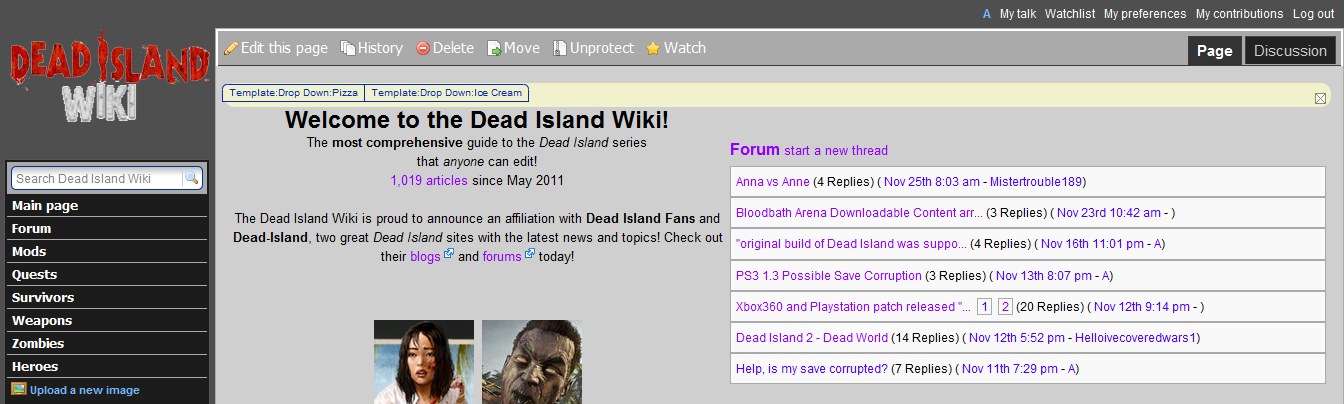
Alternate coding with different colors[edit]
Igottheconch 00:56, 28 November 2011 (UTC)
Here is my alternate version with different colors:
| Alternate |
|---|
|
/* START DROP DOWN MENUS */
/* http://www.mediawiki.org/wiki/Extension:CSS_Dropdowns#Adding_it_to_your_site */

div#siteNotice {
        width:100%;     /* makes the entire box full width */
        float:left; /*makes the  entire box  enclose the list */
        font-size:1.3em; /* SET FONT-SIZE HERE */
        background-color:#CFCFCF; /* colors the background  behind the box*/
a:link {color: #FFFFFF;}
        background:#930B00; /*  BACKGROUND COLORS FOR ENTIRE BOX */
        margin:7px -2px -2px -2px;
        padding:0;
}
div#siteNotice li {
        float:left;     /* causes the list to align horizontally instead of stack */
        position:relative; /* positioning context for the absolutely positioned drop-down */
        list-style-type:none;   /* removes the bullet off each list item */
        background-color:#930B00; /*sets the background of the menu items */

        margin: -4px 0 0 0; /*Brings the menu items up */
        padding:0 6px; /*creates space each side of menu item's text */
}
div#siteNotice li:first-child {
        -moz-border-radius-topleft: .5em;
        padding-bottom:1px; /*to fix from rounded edge */
        /* REMOVED: border-left:1px solid #002bb8; the first vertical line on the menu */
        }
div#siteNotice li:last-child {
        -moz-border-radius-topright: .5em;
        padding-bottom:1px; /*to fix from rounded edge */
        }
div#siteNotice li:hover {
        background-color:#202020; /*Background of the menu items when hovered over */
        }
div#siteNotice a {
        display:block; /*makes list items in drop down highlight and wrapped lines indent correctly */
        color:#FFFFFF;  /* sets the LINK TEXT color */
        text-decoration: none;    /* removes underline */
        }

/* the horizontal menu ends here */
/* the drop-down starts here */
div#siteNotice ul li ul {
        margin:0; /* prevents the TEMP value inheriting from the horizontal menu  */
        position:absolute; /* positions the drop-down ul in relation to its relatively positioned li parent */
        width:10em; /*sets the width of the menu - in combo with the li's 100% width, makes the menu stack*/
        left:-1px; /*aligns the drop exactly under the menu */
        }
div#siteNotice ul li ul li {
        margin: -1px 0 0 0; /* prevents the margin value inheriting from the horiz menu + bring menu items up  */
        width:100%; /* makes the list items fill the list container (ul) */

        list-style-type:none;   /* removes the bullet off each list item */
        list-style-image:none;  /* removes the bullet off each list item */
        padding:0 0 1px;
        -moz-border-radius-topright: 0;
        -moz-border-radius-topleft: 0;
        -moz-border-radius-bottomright: 0;
        -moz-border-radius-bottomleft: 0;
        }
div#siteNotice ul li ul li:last-child {
        -moz-border-radius-bottomright: 1em;
        -moz-border-radius-bottomleft: 1em;
        -moz-border-radius-topleft: 0;
        -moz-border-radius-topright: 0;
        padding-right:1px; /*to fix from rounded edge */
}
div#siteNotice ul li ul li:first-child {
        border-top:1px solid #069; /*the top edge of the dropdown */
        -moz-border-radius-topleft: 0;
}
/* make the drop-down display as the menu is rolled over */

div#siteNotice ul li ul {display:none;} /* conceals the drop-down when menu not hovered */

div#siteNotice ul li:hover ul {display:block; } /* shows the drop-down when the menu is hovered */

/* pop-out starts here */
body div#siteNotice ul li ul li ul  {
        visibility:hidden; /* same effect as display:none in this situation */
        top:-1px;
        left:10em;
        }
div#siteNoticeul li ul li:hover ul {visibility:visible;} /* same effect as display:block in this situation */

/* second level popouts start here*/

div#siteNotice ul li ul li:hover ul li ul {visibility:hidden;}

div#siteNotice ul li ul li ul li:hover ul {visibility:visible;} /* same effect as display:block in this situation */


/* third level popouts start here
I haven't tested this */

div#siteNotice ul li ul li ul li:hover ul li ul {visibility:hidden;}

div#siteNotice ul li ul li ul li ul li:hover ul {visibility:visible;} /* same effect as display:block in this situation */

/* THE HACK ZONE - */

/* hack for IE (all flavors) so the menu has a vertical line on the left */

* html div#siteNotice ul {
        float:left; /* makes the ul wrap the li's */
        /* REMOVED: border-left:1px solid #002bb8; /* adds the rightmost menu vertical line to the ul  */
        margin-left:15px; /* IE doubles the given value above - why? */
        }
/* add a top line to drops and pops in IE browsers - can't read :first-child */

* html  div#siteNotice ul li ul {
       /* REMOVED:  border-top:1px solid #002bb8;*/
        border-left:0px; /* stops the drop inheriting the ul border */
        }
/* the Tantek hack to feed IE Win 5.5-5.0 a lower value to get the pop-out to touch the drop-down */

* html  div#siteNotice ul li ul li ul {
  left:9.85em;
  voice-family: "\"}\"";
  voice-family:inherit;
  left:10em;
  }
/* and the "be nice to Opera" rule */
html>body div#siteNotice ul li ul li ul {
  left:10em;
  }


/* an Opera-only hack to fix a redraw problem by invisibly extending the ul */
/* the first-level drop stays open for 100px below the bottom but at least it works */
/* this can be reduced to as little as 22px if you don't have pop-outs */
/* the pop-out menu stays open for 22px below the bottom but at least it works

Not Tested!! */
        @media all and (min-width: 0px){
   body div#siteNotice ul li ul {padding-bottom:200px;}
   body div#siteNotice ul li ul li ul {padding-bottom:22px;}
   body div#siteNotice ul li ul li ul li ul li:hover {visibility:visible;} /* same effect as display:block in this situation */
   }

/*end Opera hack */

/* end of hack zone */

/* END OF LIST-BASED MENU */


/* finally after feeding values to all others, we deal with MAc5 IE */
/* IE5 Mac can't do drop-downs so we need to present the info in a different way*/
/* we present the drop down choices in a row and never show any second-level drops */
 /* this stylesheet is read by IE5 Mac only - hack omits 'url' and leave no space between @import and ("
Not Tested!!*/
@import("/wiki/skins/common/dropdown/ie51_menu_hack.css");
/* END OF DROP DOWN MENUS */
|
- Minor Alteration of Igottheconch's Code
I'm pretty new to all this css and mediawiki hackery so if what I did isn't what you'd call kosher, feel free to call me out. I appreciate any constructive criticism. Basically, all I added was the code at the top that set the bodyContent and siteNotice to z-index 98 and 99 respectively. The menu bar's drop down items were appearing behind the bodyContent for me. I added those lines of code and it was fixed. I was using chrome and the nice rounded edges weren't appearing for me so I added the standard "border-radius" lines in the appropriate places. Other than that all I changed was the color to suit my purposes. — Preceding unsigned comment added by Bgeels (talk • contribs)
| Alternate |
|---|
/*Ensure that the Sitenotice is above the body content*/

#bodyContent {
z-index: 98;
}
#siteNotice {
z-index: 99;
}

/* START DROP DOWN MENUS */
/* http://www.mediawiki.org/wiki/Extension:CSS_Dropdowns#Adding_it_to_your_site */

div#siteNotice {
        width:100%;     /* makes the entire box full width */
        float:left; /*makes the  entire box  enclose the list */
        font-size:1.3em; /* SET FONT-SIZE HERE */
        background-color:#FFFFFF; /* colors the background  behind the box*/
a:link {color: #FFFFFF;}
        background:#a0e37d; /*  BACKGROUND COLORS FOR ENTIRE BOX */
        margin:7px -2px -2px -2px;
        padding:0;
}
div#siteNotice li {
        float:left;     /* causes the list to align horizontally instead of stack */
        position:relative; /* positioning context for the absolutely positioned drop-down */
        list-style-type:none;   /* removes the bullet off each list item */
        background-color:#a0e37d; /*sets the background of the menu items */

        margin: -4px 0 0 0; /*Brings the menu items up */
        padding:0 6px; /*creates space each side of menu item's text */
}
div#siteNotice li:first-child {
        -moz-border-radius-topleft: .5em;
        padding-bottom:1px; /*to fix from rounded edge */
        border-top-left-radius: .5em;
        /* REMOVED: border-left:1px solid #002bb8; the first vertical line on the menu */
        }
div#siteNotice li:last-child {
        -moz-border-radius-topright: .5em;
        border-top-right-radius: .5em;
        padding-bottom:1px; /*to fix from rounded edge */
        }
div#siteNotice li:hover {
        background-color:#202020; /*Background of the menu items when hovered over */
        }
div#siteNotice a {
        display:block; /*makes list items in drop down highlight and wrapped lines indent correctly */
        color:#ff321a;  /* sets the LINK TEXT color */
        text-decoration: none;    /* removes underline */
        }

/* the horizontal menu ends here */
/* the drop-down starts here */
div#siteNotice ul li ul {
        margin:0; /* prevents the TEMP value inheriting from the horizontal menu  */
        position:absolute; /* positions the drop-down ul in relation to its relatively positioned li parent */
        width:10em; /*sets the width of the menu - in combo with the li's 100% width, makes the menu stack*/
        left:-1px; /*aligns the drop exactly under the menu */
        }
div#siteNotice ul li ul li {
        margin: -1px 0 0 0; /* prevents the margin value inheriting from the horiz menu + bring menu items up  */
        width:100%; /* makes the list items fill the list container (ul) */

        list-style-type:none;   /* removes the bullet off each list item */
        list-style-image:none;  /* removes the bullet off each list item */
        padding:0 0 1px;
        -moz-border-radius-topright: 0;
        -moz-border-radius-topleft: 0;
        -moz-border-radius-bottomright: 0;
        -moz-border-radius-bottomleft: 0;
        border-bottom-right-radius: 0;
        border-bottom-left-radius: 0;
        border-top-left-radius: 0;
        border-top-right-radius: 0;
        }
div#siteNotice ul li ul li:last-child {
        -moz-border-radius-bottomright: 1em;
        -moz-border-radius-bottomleft: 1em;
        -moz-border-radius-topleft: 0;
        -moz-border-radius-topright: 0;
        border-bottom-right-radius: 1em;
        border-bottom-left-radius: 1em;
        border-top-left-radius: 0;
        border-top-right-radius: 0;
        padding-right:1px; /*to fix from rounded edge */
}
div#siteNotice ul li ul li:first-child {
        border-top:1px solid #069; /*the top edge of the dropdown */
        -moz-border-radius-topleft: 0;
        border-top-left-radius: 0;
}
/* make the drop-down display as the menu is rolled over */

div#siteNotice ul li ul {display:none;} /* conceals the drop-down when menu not hovered */

div#siteNotice ul li:hover ul {display:block; } /* shows the drop-down when the menu is hovered */

/* pop-out starts here */
body div#siteNotice ul li ul li ul  {
        visibility:hidden; /* same effect as display:none in this situation */
        top:-1px;
        left:10em;
        }
div#siteNoticeul li ul li:hover ul {visibility:visible;} /* same effect as display:block in this situation */

/* second level popouts start here*/

div#siteNotice ul li ul li:hover ul li ul {visibility:hidden;}

div#siteNotice ul li ul li ul li:hover ul {visibility:visible;} /* same effect as display:block in this situation */


/* third level popouts start here
I haven't tested this */

div#siteNotice ul li ul li ul li:hover ul li ul {visibility:hidden;}

div#siteNotice ul li ul li ul li ul li:hover ul {visibility:visible;} /* same effect as display:block in this situation */

/* THE HACK ZONE - */

/* hack for IE (all flavors) so the menu has a vertical line on the left */

* html div#siteNotice ul {
        float:left; /* makes the ul wrap the li's */
        /* REMOVED: border-left:1px solid #002bb8; /* adds the rightmost menu vertical line to the ul  */
        margin-left:15px; /* IE doubles the given value above - why? */
        }
/* add a top line to drops and pops in IE browsers - can't read :first-child */

* html  div#siteNotice ul li ul {
       /* REMOVED:  border-top:1px solid #002bb8;*/
        border-left:0px; /* stops the drop inheriting the ul border */
        }
/* the Tantek hack to feed IE Win 5.5-5.0 a lower value to get the pop-out to touch the drop-down */

* html  div#siteNotice ul li ul li ul {
  left:9.85em;
  voice-family: "\"}\"";
  voice-family:inherit;
  left:10em;
  }
/* and the "be nice to Opera" rule */
html>body div#siteNotice ul li ul li ul {
  left:10em;
  }


/* an Opera-only hack to fix a redraw problem by invisibly extending the ul */
/* the first-level drop stays open for 100px below the bottom but at least it works */
/* this can be reduced to as little as 22px if you don't have pop-outs */
/* the pop-out menu stays open for 22px below the bottom but at least it works

Not Tested!! */
        @media all and (min-width: 0px){
   body div#siteNotice ul li ul {padding-bottom:200px;}
   body div#siteNotice ul li ul li ul {padding-bottom:22px;}
   body div#siteNotice ul li ul li ul li ul li:hover {visibility:visible;} /* same effect as display:block in this situation */
   }

/*end Opera hack */

/* end of hack zone */

/* END OF LIST-BASED MENU */


/* finally after feeding values to all others, we deal with MAc5 IE */
/* IE5 Mac can't do drop-downs so we need to present the info in a different way*/
/* we present the drop down choices in a row and never show any second-level drops */
 /* this stylesheet is read by IE5 Mac only - hack omits 'url' and leave no space between @import and ("
Not Tested!!*/
@import("/wiki/skins/common/dropdown/ie51_menu_hack.css");
/* END OF DROP DOWN MENUS */
|
- I've copied your changes onto the main page. -ThePlaz (talk) 03:24, 21 June 2012 (UTC)
old screenshot replaced with a newer screenshot[edit]
replaced the old screenshot with a screenshot that has better colors. Igottheconch 01:04, 28 November 2011 (UTC)

adding 2nd and 3rd lvl dropdown[edit]
Has anyone gotten a 2nd or 3rd level dropdown menu to work?
I got the first one, but I cannot figure how to add more.
I have:
Book
==>Book1
I want:
Book
==>Book1
====>Page1
====>Page2
etc.
— Preceding unsigned comment added by Tnlu5t (talk • contribs)
- fix for your issue
- on the Extension page, where the CSS code is, there is a type in the CSS code:
div#siteNoticeul li ul li:hover ul {visibility:visible;} /* same effect as display:block in this situation */
- should be
div#siteNotice ul li ul li:hover ul {visibility:visible;} /* same effect as display:block in this situation */
- hope that fixes your issue. — Preceding unsigned comment added by 24.105.156.1 (talk • contribs)
Incorporation into Skin[edit]
I was just going to post that I have worked to incorporate this extension directly into a skin I am developing, called Island.
Instead of using the Common.css method you utilize here, I added it to its own .css file and included it directly into the skin.
Hope that is okay with you. — Preceding unsigned comment added by Anthill softworks (talk • contribs)
- No problem! --ThePlaz (talk) 03:18, 24 September 2013 (UTC)
greedy extension[edit]
This extension is the only extension allowed in Mediawiki:Sitenotice. Any other information in Mediawiki:Sitenotice has the exact same color and formatting as this the extension colors and formatting in: MediaWiki:Common.css.
For example you make all text in MediaWiki:Common.css white, ALL THE TEXT in Mediawiki:Sitenotice is white.
Is this the reason why wikia no longer allows site Mediawiki:Sitenotices??
Is it possible to have all the colors and formating for the drop down added into Extension:CSS_Dropdowns#Adding_the_Dropdowns_to_your_sitenotice_page instead of to MediaWiki:Common.css??? Then you can format and add other items in Mediawiki:Sitenotice without the same formating.
I am not sure how to do this.
Igottheconch (talk) 17:19, 17 September 2013 (UTC)
Hi,
You are right, I did not build my extension very well. It was one of the first CSS project I did, and I made it way messier than it had to be. Sitenotice just gets it on every page. I am not sure what Wikia allows or not. They might not want a way to put text on every page.
You might be able to inline style using <style></style> if inline style is permitted on your install (I forget what the default is).
To address the issue of all the text in the Sitenotice being reformatted, you can wrap everything in another div. Sorry for the messy coding.--ThePlaz (talk) 03:18, 24 September 2013 (UTC)