

CAPTCHA
CAPTCHAs (short for "Completely Automated Public Turing test to tell Computers and Humans Apart") are utilized on Wikimedia wikis, via the ConfirmEdit extension, as a means of ostensibly preventing spam and deterring spammers. In most wikis, a user might hit a CAPTCHA when trying to create an account, create a new page, or add an external link to a page.
On pt.wiki, in 2008–2013 the CAPTCHA was also "temporarily" shown on every edit of unregistered and new users, allegedly to reduce vandalism (see discussion and bugzilla:41745).
There are a number of problems with the current CAPTCHA implementation.
- They are only available in English (bugzilla:5309): the words used by our CAPTCHAs, however they are created, should be in the user's language. An unknown number of new users and edits are lost from non-English speaking people.
- They violate accessibility principles (bugzilla:4845).
- They don't effectively prevent bots from spamming.
Alternatives that might be implemented in the future[edit]
Image CAPTCHAs[edit]
Captcha images do not require text input which helps for mobile and internationalisation issue. Some ideas based on images:
- Find the different one (view prototype). Several images from the same category (e.g., people) are shown mixed with one image from a different category (e.g., cat). Humans should be able to recognise which is the different one. Note that in this case, the question is always the same (find the different one) and the categories used are not exposed to the user.
- Find all images of a kind (view prototype). Images from two or more categories are presented together. The user is explicitly asked to find all the images of a given type (e.g., all images of people wearing glasses).
- Tag images (view prototype). The user is presented with images that contain some tagged elements and options to pick the correct tag (e.g., is it a bird? is it a plane?).
The hard part here is how to create images and verify data in a way that is not exploitable to spambots. You need a very large set of CAPTCHAs (hundreds of thousands, ideally), otherwise an attacker can just map your CAPTCHA database. If you use a public image repository (such as Commons) or a public data source (such as Commons categories), chances are an attacker can match the CAPTCHA to the source and figure out the solution from that.
-
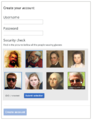 Find all captcha idea
 -
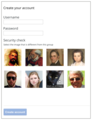 Find the different captcha idea
 -
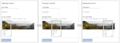 Panorama captcha idea


Replacing CAPTCHA with a honeypot[edit]
One possibility for avoiding localizations issues with the CAPTCHA is simply to remove it and replace it with a honeypot.
A homegrown reCAPTCHA clone[edit]
Write a version of reCAPTCHA that uses document images that have been processed by MediaWiki's ProofreadPage extension for Wikisource: WikiCAPTCHA. In other words, a CAPTCHA that feeds data to ProofreadPage to augment its OCR processing. You might build on existing code. It is worth noting that "reCAPTCHA hold no specific patents for the technology behind their text CAPTCHA algorithms (At least none they discuss on their website or are able to be found on the US Patents & Trademark Office site", according to one blogger [1]).
Also discussed at Wikimania 2012 with the presentation Wikicaptcha: a ReCAPTCHA-like solution for Wikisource
The advantage of this approach is that we can make the latent work force currently wasted in CAPTCHA into profit for a Wikimedia project (Wikisource); and that we can start with a limited data set. In fact, working the reCaptcha way we could create some sort of bootstrap data set, then show people a mix of captchas with known and unknown solutions, and use the known ones for verification and the unknown ones for generating more data. But that is not easy and should get significant focus in the project if you want a CAPTCHA system which is of any practical use at the end.
Accessibility[edit]
The accessibility of our current CAPTCHA is extremely bad. If the user has impaired eyesight or uses a screenreader the text-based CAPTCHA is almost entirely inaccessible to them. A handful of our larger wikis solve this via a volunteer-run account request system. Alternatives like image CAPTCHAs still violate accessibility principles (bugzilla:4845), an alternative such as an audio CAPTCHA could be considered, but would itself still fail to provide accessibility for people who are deaf-blind.
See also[edit]
- Admin tools development, the field of Wikimedia Engineering responsible for this and other tools
- Bug 38640
- Research:Account creation UX/CAPTCHA
- You (probably) don't need ReCAPTCHA (2019)
- TEDxCMU -- Luis von Ahn -- Duolingo: The Next Chapter in Human Computation
- Recent discussions
- Captchas and non-English speakers part I and part II
- Wikipedia CAPTCHA repair (2011-11-03): «Now that the Wikipedia CAPTCHA has been comprehensively broken by Burzstein et. al. in their paper "Text-based CAPTCHA Strengths and Weaknesses" [...] I've reworked the 2005-era CAPTCHA-image-generating Python script in the CAPTCHA engine» – code still waiting for reviewers.
- Suggestion: replace CAPTCHA with better approaches (July 2012)
- Prominent websites which don't use CAPTCHA
- Other resources
- Bots Are Better than Humans at Solving CAPTCHAs (on An Empirical Study & Evaluation of Modern CAPTCHAs, 2023)
- Asirra: A CAPTCHA that Exploits Interest-Aligned Manual Image Categorization, CCS’07, October 29–November 2, 2007, Alexandria, Virginia, USA. (Contains references to other userful papers on CAPTCHA.)
- Philippe Golle. 2008. Machine learning attacks against the Asirra CAPTCHA. In Proceedings of the 15th ACM conference on Computer and communications security (CCS '08). ACM, New York, NY, USA, 535-542. DOI=10.1145/1455770.1455838